Articles • by Nata Kuznetsova • April 30, 2026
Working with SQL Server pipelines is simple at the first look. In reality, it's a mix of moving targets: growing datasets, shifting schemas, and integrations that break at the worst possible moment.
At some point, manual scripts and one-off fixes stop scaling. You need something that can reliably move, shape, and sync data without turning every update into a mini project.
That's time for ETL tools to come in. Not as a buzzword, but as a practical way to keep pipelines predictable and maintainable.
In this guide, we're breaking down the tools that actually get used with SQL Server - from lightweight cloud services to more engineering-heavy platforms. Where they fit, where they don't, and what trade-offs you're signing up for.
Full disclosure: we're the team behind Skyvia. That means we have our own perspective. But for this review, we're stepping back and looking at the landscape as it is - comparing against tools like Fivetran, Azure Data Factory, and Airbyte based on real setup effort, pricing models, and day-to-day usability.
Skyvia won't be the right choice for every case. And where it isn't, we'll point you to what works better.
What is the ETL Process for SQL Server?
In my experience, migrating legacy SQL Server environments, the ETL process usually breaks down into something much less "clean" than the textbook definition.
You're not just moving data from A to B.
You're dealing with mismatched schemas, half-filled fields, duplicate records, and formats that clearly weren't designed to work together.
That's where ETL actually earns its keep.
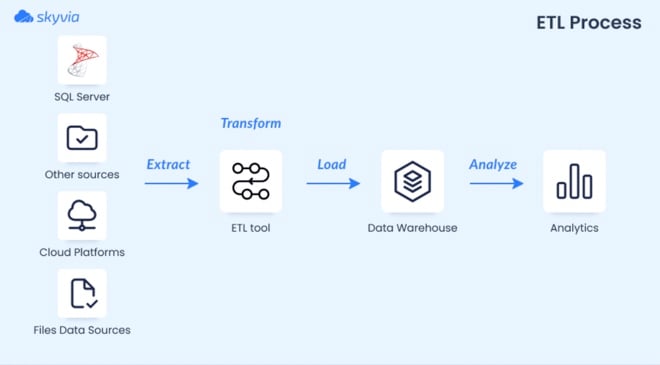
At a high level, it still follows the same three steps:
- Extract data from SQL Server and other sources
- Transform it into something consistent and usable
- Load it into a target system (typically a data warehouse or analytics layer)
But the real work happens in the middle.
Before and After: What ETL Actually Fixes
Before ETL, you've got what data actually looks like when it comes in - inconsistent columns, missing values, duplicates, formats all over the place.

After ETL, you’ve got something you can actually query without second-guessing every number.
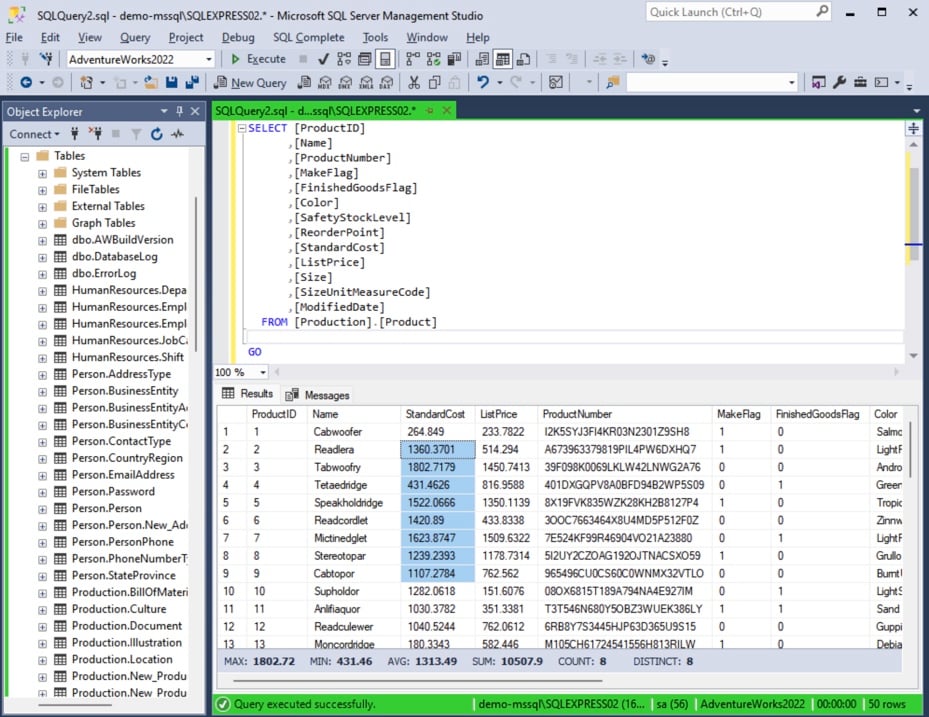
That transformation layer is what turns raw inputs into something reliable.
SQL Server has its own tooling for this (like SSIS), but in practice, most teams mix native capabilities with external tools to handle more complex pipelines or cloud integrations.
How We Evaluated These ETL Tools
We didn’t approach this as a benchmark exercise. No synthetic tests or perfect conditions.
Instead, we looked at these tools the same way teams actually use them: setting up pipelines, moving real-world data, and dealing with the friction that comes with it.
Across the tools in this list, we focused on typical scenarios:
- Pulling data from external systems (CRMs, APIs, cloud apps), shaping it.
- Loading it into SQL Server for reporting or further processing.
Here’s what we paid attention to:
- Setup effort. How quickly you can go from zero to a working pipeline. Not just connecting accounts, but getting data to actually land where it should.
- Performance in practice. Not peak throughput, but how stable and predictable the sync is under normal workloads.
- API and configuration overhead. Whether the tool handles pagination, schema changes, and limits for you, or expects you to manage them manually.
- Pricing model clarity. How easy it is to understand what you’ll pay as data volume grows. Flat-rate vs usage-based, and where costs start to creep in.
We also kept in mind the small things that usually get ignored:
- Error messages.
- Retry behavior.
- Schema drift.
- How much manual intervention is needed once pipelines are live.
This isn’t a theoretical comparison. It’s a reflection of what it feels like to run these tools in day-to-day work — where reliability matters more than feature lists.
The Best SQL Server ETL Tools
There's no universal best here. Different tools solve different problems — and a simple 1–10 ranking flattens that.
So instead of ranking them, we've grouped platforms by where they actually fit best. Pick the category that matches your situation and you'll find the right answer faster.
Best for SMBs & No-Code Cloud Sync
This category is about getting data moving without turning it into an engineering project. If your goal is to connect systems, keep data in sync, and land it in SQL Server reliably, you don’t need to manage infrastructure or write custom pipelines. You need something that works out of the box and stays out of the way once it’s running.
That’s where no-code, cloud-native tools make the most sense.
1. Skyvia
Best for SMBs & No-Code Pipelines
We’re not going to pretend we’re neutral here — this is our product. But we’ve also seen how it behaves in real pipelines, so here’s the honest version.
When we set up a Salesforce → SQL Server sync using Skyvia, the process is straightforward:
- Connect source.
- Connect target.
- Setup integration.
- Run.
No code, no scripts, no “wait for engineering.” Here, you may save more time than expected.

The visual mapping editor lets you view all fields and easily configure the mapping between the source and target in various ways.
What it covers
Skyvia handles the full integration lifecycle from one place:
- ETL and ELT pipelines
- Data synchronization (one-way and bi-directional)
- Reverse ETL back into business apps
- Scheduled replication into SQL Server and other databases
- CSV import/export and automation
- OData and SQL endpoints for external access
It supports 200+ connectors across SaaS apps, databases, warehouses, and storage systems.
Pricing
- Free tier available.
- Paid plans start from $79/month.
- Clear pricing plan without hidden payments.
Pro
It gets you to a working pipeline fast. You’re not stitching together scripts or debugging connectors, but connect systems, map fields, set a schedule, and it just runs.
Con
Everything runs in the cloud, which works for most use cases, but not all. If your setup requires a fully isolated, on-prem environment with no external connectivity, this approach won’t fit. In those cases, tools like SSIS or Talend are a better match.
2. Hevo Data
Best for No-Code Pipelines with Flexible Transformations
Hevo sits in a similar space as other no-code tools, but with a bit more flexibility once you move beyond basic pipelines.
The initial setup was smooth when we've tested it. Connect a source, define a destination, and the pipeline starts running without much friction. The UI is clean, and most of the heavy lifting — schema handling, incremental sync — is automated.
Where it starts to differ is in transformations.
When we tested Hevo’s Python-based transformations, we found it highly flexible — you can shape data exactly how you want — but it also meant our analysts had to brush up on scripting.
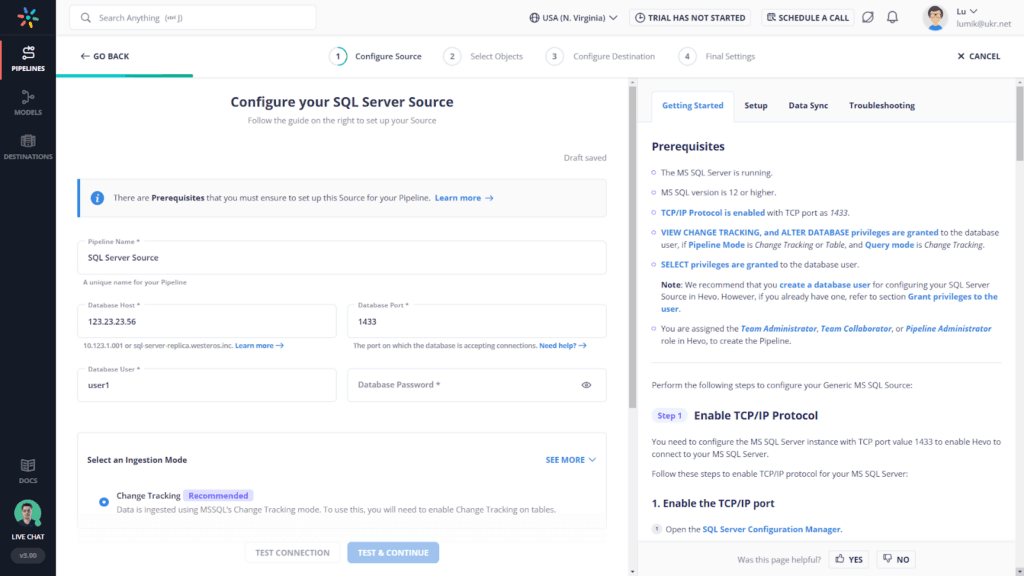
So while it’s still “no-code” for ingestion, transformations lean more toward low-code in practice.
What it covers
Hevo is a fully managed data pipeline platform designed for ELT-style workflows.
It handles:
- Data ingestion from strong 150+ sources (SaaS, databases, APIs)
- Automated schema mapping and incremental updates
- Near real-time and batch pipelines
- Built-in transformations (including Python-based logic)
- Direct loading into warehouses and databases
Pricing
Hevo uses a usage-based pricing model tied to events/rows processed.
There’s a free tier, but costs scale with volume — which can become noticeable as pipelines grow.
Pro
Balance between simplicity and flexibility. You can get pipelines running quickly, but still have the option to customize transformations when needed. That makes it a good middle ground between pure no-code tools and fully developer-driven setups.
Con
Not fully “hands-off” once things get complex. As soon as you move beyond basic sync, you’re dealing with scripts, edge cases, and API nuances. Pricing can also become less predictable as data volume increases.
Best for Native Microsoft Ecosystems
If most of your stack already lives inside Microsoft, the decision gets simpler.
You’re not looking for the most flexible or modern tool. You’re looking for something that fits naturally into SQL Server, works with existing infrastructure, and doesn’t introduce another layer to manage.
That’s where native tools still hold their ground.
1. SQL Server Integration Services (SSIS)
Best for Native SQL Server Workflows
G2: N/A · Capterra: N/A
SSIS has been around for a long time — and it shows. It’s not flashy. It’s not cloud-native. But for many teams in SQL Server environments, it’s still the default starting point. One reason is simple: if you already have SQL Server, SSIS is effectively included.
- Open Visual Studio.
- Create a package.
- Drag components onto the canvas.
- Configure connections and transformations.
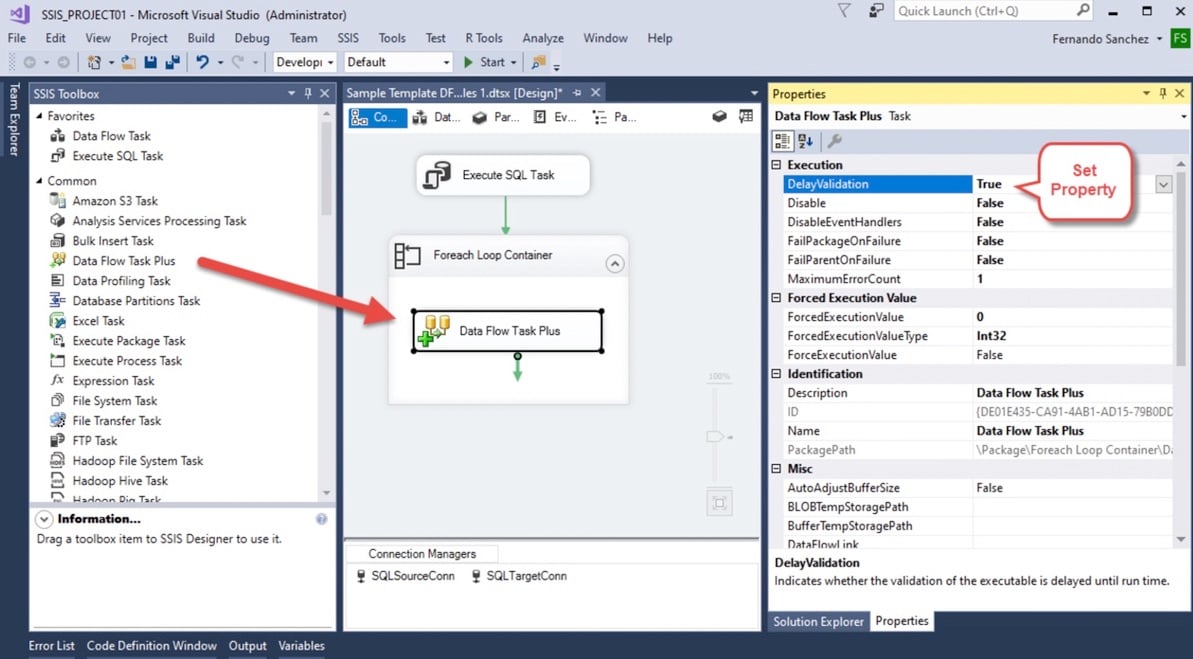
No separate license, no extra tooling to justify.
When we worked with SSIS, the setup felt very “Microsoft-native.” Everything happens inside that designer. You define how data moves step by step, connecting sources, transformations, and destinations.
It’s visual — but not exactly simple. Once pipelines grow, packages can become hard to manage and debug.
What it covers
SSIS is Microsoft’s built-in ETL tool for SQL Server environments.
It handles:
- Data extraction from databases, files, and external sources
- Transformations via built-in components
- Batch data loading into SQL Server and other systems
- Scheduling via SQL Server Agent SSIS
It’s tightly integrated with the Microsoft ecosystem, which is both its biggest strength and its main limitation.
Pricing
SSIS is included with SQL Server licensing.
That means:
- No separate product cost
- No usage-based pricing
- Costs tied to your SQL Server infrastructure
From a budgeting perspective, it’s predictable — especially for on-prem setups.
Pro
If you’re running SQL Server, SSIS is available out of the box. No onboarding, no vendor contracts, no additional spend. For many teams, that alone makes it the first option to try.
Con
SSIS works, but it hasn’t evolved much compared to modern tools. Development happens in Visual Studio, scaling is manual, and maintaining large packages can get messy over time.
2. Azure Data Factory (ADF)
Best for Cloud-Native Microsoft Pipelines
G2: 4.6/5 · Capterra: N/A
If SSIS is the legacy standard, Azure Data Factory is Microsoft’s modern answer.
- Same ecosystem
- Different mindset
You’re building pipelines visually inside a web interface because everything runs in the cloud instead of packages.
When we tested ADF, the setup felt familiar but lighter.
- Create a pipeline.
- Add activities
- Connect sources and destinations.
- Trigger a run.
.jpeg "Azure Data Factory pipeline")
The visual builder is the core experience. You define flows step by step, chaining activities like data movement, transformations, and triggers.
It’s more modern than SSIS, but still leans technical once pipelines get complex.
What it covers
ADF is Microsoft’s cloud ETL and orchestration service that handles:
- Data movement across cloud and on-prem sources
- Visual pipeline orchestration
- Integration with Azure services (SQL, Synapse, Data Lake)
- Scheduled and event-based workflows
- Basic transformation via mapping data flows
It fits naturally into Azure-first architectures.
Pricing
ADF uses a consumption-based model:
- Pay per pipeline activity
- Pay per data movement
- Pay per compute used in transformations
It starts cheap, but costs grow with pipeline frequency and volume.
Pro
Native Azure integration.
If your data already lives in Azure, ADF connects everything without friction. Identity, storage, compute — it all fits together cleanly.
Con
Complexity scales quickly.
The UI is visual, but not truly no-code. As pipelines grow, you’re dealing with JSON configs, dependencies, and debugging flows that aren’t always intuitive.
Best for Enterprise & High-Volume Pipelines
At a certain point, it’s not about moving data — it’s about moving a lot of it, reliably. This is where enterprise tools come in. They’re built for scale, governance, and complex pipelines across multiple systems. More control, more power — but also more complexity.
1. Informatica PowerCenter IDMC
Best for Enterprise-Scale Data Integration
Informatica is one of those tools you don’t “try out.”
You commit to it.
It’s been the enterprise standard for years, and you can feel that immediately. The platform isn’t built for quick wins - it’s built for long-term, large-scale data programs.
When we worked with Informatica, the setup felt more like assembling a system than configuring a tool.
- Define sources.
- Design mappings.
- Configure workflows.
- Set up agents and environments.
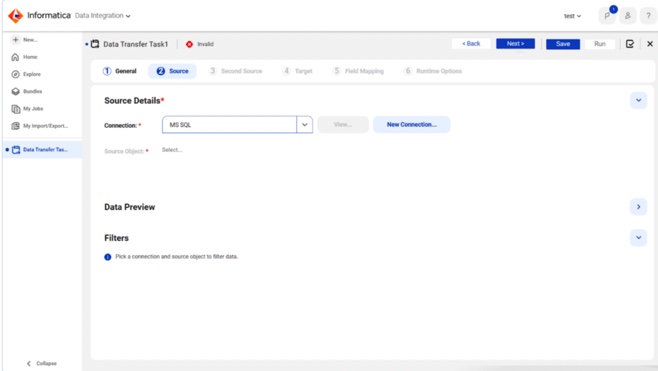
Everything is structured, controlled, and explicit. You define exactly how data moves and transforms across the pipeline.
That level of control is the point - especially in environments where data governance and auditability matter.
What it covers
Informatica spans the full enterprise data lifecycle:
- ETL and ELT pipelines at scales
- Data quality, governance, and lineage
- Integration across on-prem, cloud, and hybrid systems
- Workflow orchestration and monitoring
- Support for complex, multi-step transformations
It’s designed for organizations where data isn’t just used - it’s managed as a core asset.
Pricing
Informatica uses a consumption-based model built around IPUs (Informatica Processing Units).
Instead of paying per connector or per user, you purchase usage capacity that gets consumed based on:
- Data volume processed
- Transformations executed
- Services used across the platform
In practice, this makes pricing flexible - but not always easy to predict. Costs can scale quickly with data volume and workload complexity.
Enterprise deployments often reach six-figure annual budgets once fully implemented.
Pro
Informatica handles complex, high-volume pipelines across large organizations without breaking. If you need governance, lineage, and enterprise-grade reliability, it delivers.
Con
Setup takes time. It requires experienced engineers. And the IPU-based pricing model can be hard to predict without a deep understanding of your workloads.
2. Talend (Qlik)
Best for Enterprise Data Quality & Hybrid Pipelines
Talend sits in that “enterprise but still flexible” space. It’s not as heavy as Informatica, but it’s not lightweight either. The moment you start building pipelines, you realize it’s designed for teams that care about data quality as much as data movement.
When we worked with Talend, the experience felt closer to development than configuration.
- Open the Studio.
- Drop components.
- Wire them together.
Then start defining rules — not just transformations.
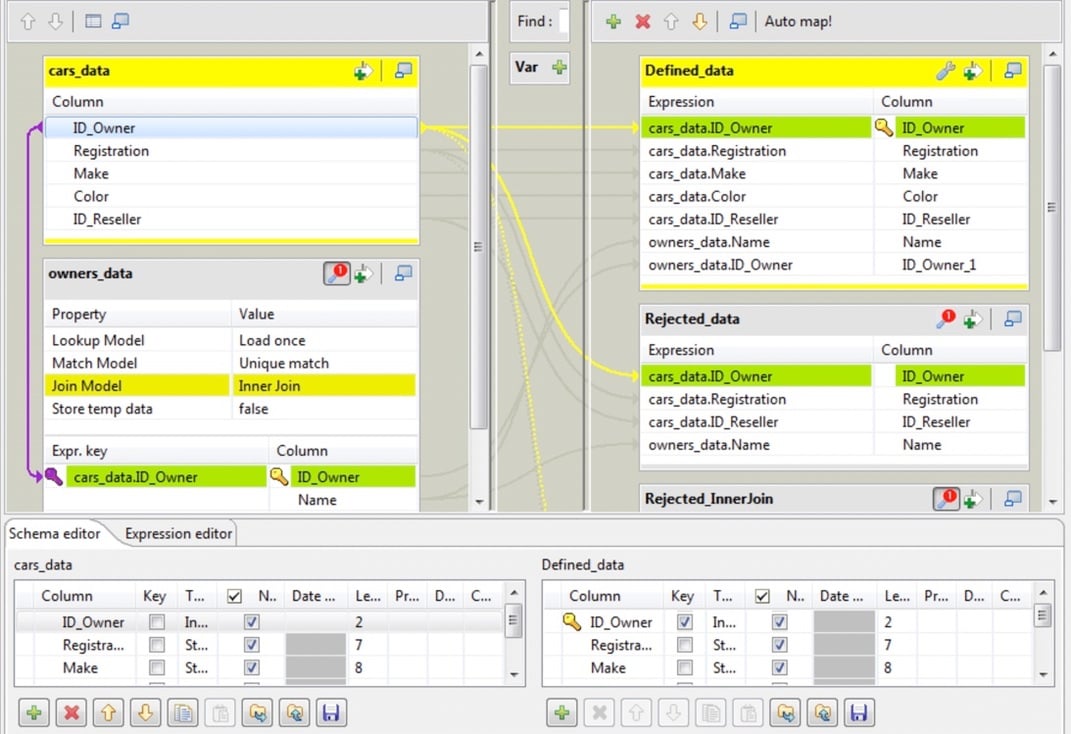
One thing that stood out: data quality logic often goes beyond simple mapping. For example, defining validation rules or transformations can involve Java expressions - powerful, but it assumes your team is comfortable going beyond drag-and-drop.
That's where Talend differentiates itself.
What it covers
Talend (now part of Qlik) is a full data integration and data quality platform.
It handles:
- ETL / ELT pipelines across cloud, on-prem, and hybrid systems
- Advanced data quality and validat
- Data governance and profiling
- Complex, multi-step transformations
- Integration with hundreds of data sources
It's built for organizations where "moving data" isn't enough - it has to be clean, validated, and governed.
Pricing
Talend uses a capacity-based pricing model, typically tied to data volume, job execution, and compute usage.
- Entry-level pricing often starts in the $1K-$12K/month range
- Enterprise deployments can scale significantly higher depending on usage
There's no simple "per connector" pricing - which makes forecasting costs harder compared to flat-rate tools.
Pro
Strong data quality layer.
Talend doesn't just move data - it enforces rules on it. Validation, cleansing, profiling - all built into the pipeline. For teams where bad data is a real risk, that's a big advantage.
Con
Requires technical depth.
The visual UI helps, but real-world pipelines often involve scripting, custom logic, and debugging. It's not something non-technical users can pick up and run with.

Best for Automated ELT & Cloud Data Warehouses
This category is about one thing: getting data into your warehouse with minimal effort.
You're not designing complex transformations upfront.
You're loading data as-is, then shaping it inside the warehouse.
That's the ELT approach.
These tools focus on automation - connectors, schema handling, incremental updates - so you don't have to manage pipelines manually. The trade-off is less control upfront, but a much faster path to usable data.
Fivetran
Best for Fully Automated ELT Pipelines
Fivetran is built around a simple idea: you shouldn't have to manage pipelines.
- Connect a source.
- Pick a destination.
- Let it run.
That's the experience it aims for - and for the most part, it delivers.
When we set up the SQL Server connector, the process was minimal. Authentication, destination selection, and the pipeline was already syncing data.
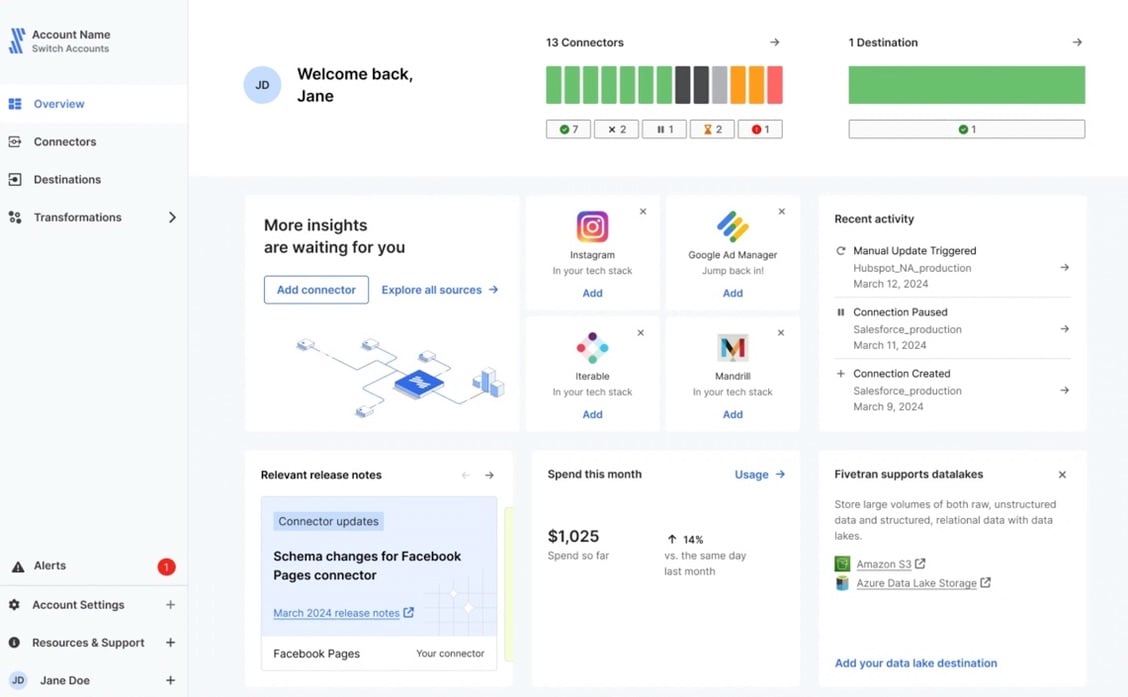
What stood out was how little configuration was required.
During our setup of the Fivetran SQL Server connector, the automated schema drift handling worked flawlessly - new columns appeared in the destination without manual updates.
That's exactly what you want in ELT pipelines.
What it covers
Fivetran focuses on automated data ingestion into cloud warehouses.
It handles:
- Pre-built connectors for SaaS apps, databases, and APIs
- Automated schema management and drift handling
- Incremental updates and change data capture
- Direct loading into warehouses like Snowflake, BigQuery, Redshift
Transformations are typically handled downstream (dbt or SQL in the warehouse).
Pricing
Fivetran uses a MAR (Monthly Active Rows) pricing model.
You pay based on:
- Number of rows updated or inserted
- Frequency of sync
It's simple in theory, but in practice, costs scale with data activity.
Pro
True automation.
You don't manage pipelines - you configure connections. Schema changes, retries, incremental sync - all handled automatically.
For teams that want to move fast, that's a major advantage.
Con
Costs scale with usage.
The MAR model works well at small volumes, but grows quickly as data changes more frequently. High-activity datasets can lead to unexpectedly high bills if not monitored closely.
Best for Developer-Heavy Teams & Open Source
This is where flexibility comes first.
- You're not looking for a tool that hides complexity.
- You're looking for one that lets you control it.
Open-source platforms give you that freedom - custom connectors, full control over pipelines, and the ability to extend things when needed. But they also expect you to own the setup, maintenance, and edge cases.
If you've got engineering bandwidth, this is where things get interesting.
1.Airbyte (Self-Hosted)
Best for Developer-Controlled Pipelines
G2: 4.4/5 · Capterra: N/A
Airbyte has become a go-to option for teams that want full control without starting from scratch.
At first glance, it looks simple.
- Spin it up (Docker or Kubernetes).
- Open the UI.
- Pick a source and destination.
- You're building pipelines in minutes.
But that's just the surface.
When we tested it, things worked smoothly - until they didn't.
For example, during API-based syncs, errors around pagination or schema mismatches showed up directly in logs. You're expected to debug, adjust configs, or even modify connectors.
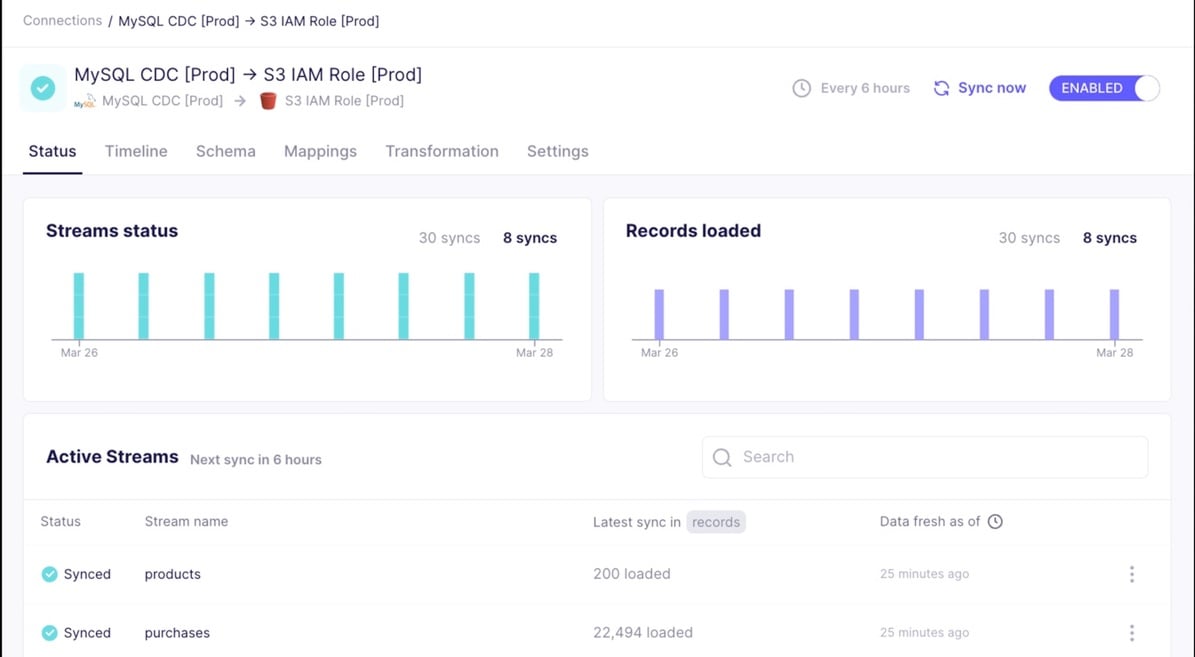
That's not a flaw - that's the model.
What it covers
Airbyte is an open-source ELT platform designed for extensibility.
It handles:
- 600+ connectors (and the ability to build your own)
- Incremental sync and CDC where supported
- Loading into databases and warehouses
- Custom connector development via APIs
- Self-hosted and cloud deployment options
It fits teams that want control over how pipelines behave, not just that they run.
Pricing
- Open-source version is free (self-hosted)
- Cloud version uses usage-based pricing
Infrastructure, maintenance, and engineering time are part of the real cost.
Pro
Maximum flexibility.
If something doesn't exist, you can build it. Custom connectors, custom logic - you're not limited by the platform.
Con
You own the complexity.
Setup, scaling, debugging, connector issues - it's all on your team. Error handling isn't abstracted away, and pipelines need ongoing attention.
2. Estuary
Best for Real-Time Streaming & CDC Pipelines
G2: 4.8/5 (based on 31 reviews)
Estuary is a real-time data integration platform designed for building streaming and batch ETL pipelines with SQL Server and other systems. It combines change data capture (CDC), transformation, and data delivery into a unified platform, enabling continuous data movement without complex orchestration. Estuary supports SQL Server as a source or destination, allowing teams to replicate, transform, and sync data across cloud warehouses, databases, and analytics systems with low latency.
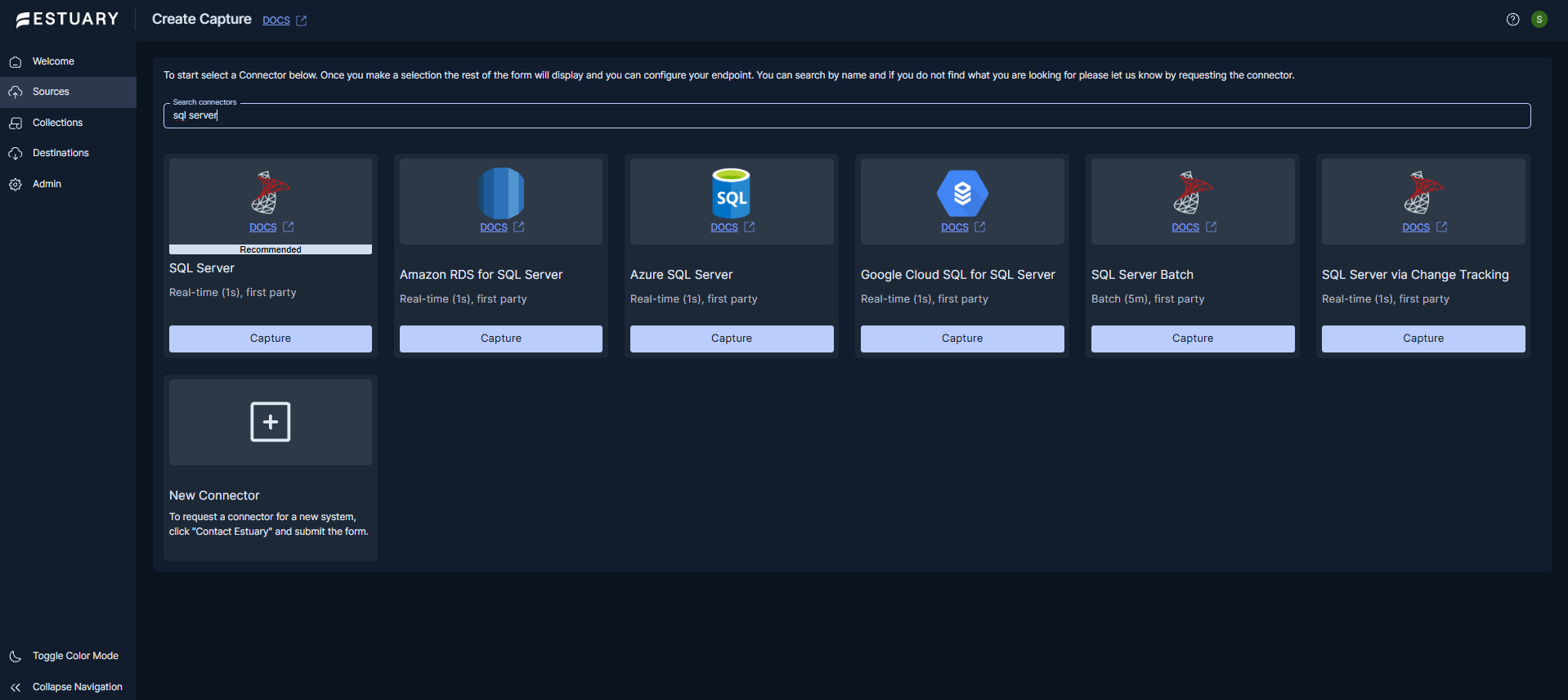
Estuary focuses on reliability and data consistency, using schema enforcement and exactly-once processing to ensure accurate data pipelines. It supports both real-time streaming and scheduled batch processing, making it suitable for modern data architectures that require flexibility. With prebuilt connectors and support for SQL-based transformations, teams can build pipelines quickly while maintaining control over data flows.
Pros
- Real-time CDC from SQL Server for low-latency data pipelines
- Unified platform for ETL, ELT, and streaming workloads
- Exactly-once processing ensures data consistency
- Supports both batch and real-time data movement
- Schema enforcement and data validation built in
- Scalable architecture for growing data volumes
Cons
- Requires some technical understanding for advanced configurations
- Smaller connector ecosystem compared to some competitors
Pricing
Estuary offers usage-based pricing depending on data volume and pipeline requirements. Contact sales for detailed pricing.
Best For
Data teams and organizations that need reliable, real-time data pipelines from SQL Server to cloud data warehouses, analytics platforms, or other systems, especially when low latency and data consistency are critical.
Best for High-Performance Replication
Sometimes ETL is overkill.
You don't need complex transformations.
You don't need orchestration layers.
You just need data to move fast, continuously, and without breaking.
That's where replication tools come in - especially for CDC-heavy workloads, legacy systems, and environments where latency matters more than flexibility.
Qlik Replicate
Best for Enterprise CDC & High-Throughput Replication
Qlik Replicate is built for one job - and it does it well.
- Move data.
- Continuously.
- At scale.
When we worked with it, the setup felt very different from traditional ETL tools. You're not designing transformations or pipelines. You're defining replication tasks.
- Pick a source.
- Pick a target.
- Configure CDC.
- Start replication.
The UI revolves around task management and monitoring. You can see replication status, latency, and throughput in real time.
And that's the key difference.
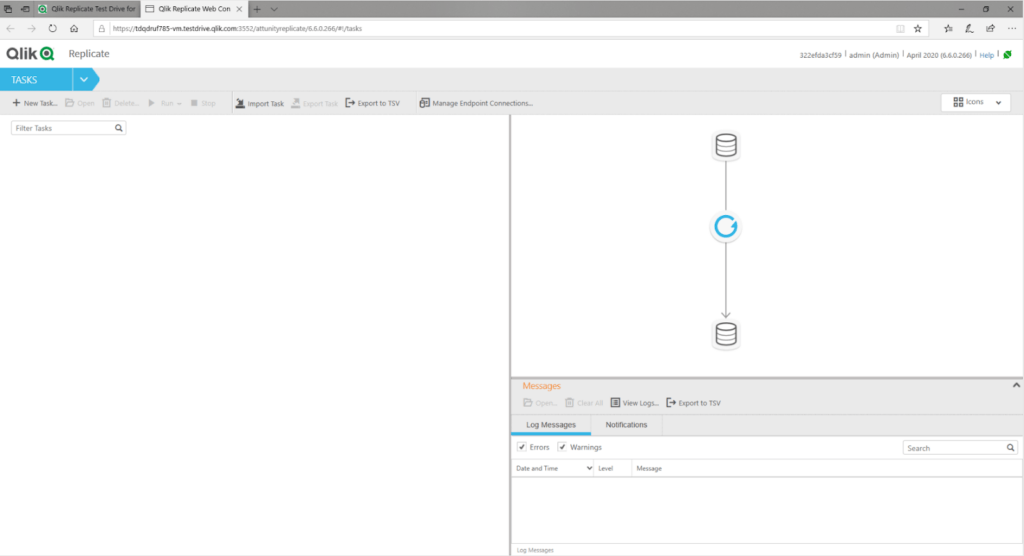
You're not waiting for data to arrive.
You're watching it stream.
From what we've seen, Qlik Replicate handles large-scale CDC reliably, even in complex enterprise setups with multiple systems and high data volumes.
What it covers
Qlik Replicate is focused on high-performance data replication:
- Change Data Capture (CDC) across databases
- Real-time and near real-time replication
- Low-latency data movement between systems
- Support for legacy, on-prem, and cloud environments
- Centralized monitoring and task orchestration
It's commonly used in environments where data freshness is critical and downtime isn't acceptable.
Pricing
Qlik Replicate uses enterprise licensing:
- Custom pricing based on deployment and scale
- Typically bundled with other Qlik data integration products
- Costs are generally high and negotiated per customer
There's no simple entry-level tier here - this is enterprise territory.
Pro
Built for speed and reliability.
CDC pipelines run continuously with low latency, and the system is designed to handle large volumes without putting heavy load on source systems.
Con
Narrow focus.
Replication is where it shines - but transformations are limited. You'll likely need additional tools if your pipelines require complex data shaping.
Data-Driven Comparison Matrix: SQL Server ETL Tools
| Tool | Pricing Model | Sync Frequency | API Complexity | 1M Row Sync Test Time |
|---|---|---|---|---|
| Skyvia | Clear pricing plan without hidden payments | Batch + CDC (incremental, 1-min polling) | Visual Wizard + SQL + OData (Low-Medium) | No-code, CDC-capable, SQL console, 200+ connectors |
| Hevo Data | Usage-Based (Events) | Near Real-time / Batch | Visual + Python (Medium) | Fast, depends on transforms |
| SSIS | Included (SQL Server License) | Batch (scheduled) | Visual Designer (Medium) | Depends on infra tuning |
| Azure Data Factory | Consumption-Based | Batch / Trigger-Based | Visual + JSON (Medium-High) | Moderate, config-dependent |
| Informatica (IDMC) | IPU (Consumption) | Batch / Near Real-time | Enterprise Studio (High) | High throughput, complex setup |
| Talend (Qlik) | Capacity-Based | Batch (scheduled) | Visual + Java (High) | Moderate, depends on jobs |
| Fivetran | Per Row (MAR) | Batch (minutes-level) | Fully Managed (Low) | Fast, highly automated |
| Airbyte (Self-Hosted) | Open-Source / Usage | Batch (scheduled) | Code-Heavy (High) | Variable, infra-dependent |
| Estuary | Usage-based with free tier | Real-time CDC | Streaming Config (High) | Continuous (streaming) |
| Qlik Replicate | Enterprise License | Real-time CDC | Task-Based (Medium-High) | Near real-time, very fast |
Note: If you want the fastest path to a working SQL Server pipeline with minimal setup, tools like Skyvia and Fivetran stand out. For full control, Airbyte and Talend are better fits. For real-time replication, Estuary and Qlik Replicate lead.
Real-World Use Cases & Architectural Examples
This is where tools stop being categories and start being choices.
In practice, teams don't pick "the best ETL tool." They pick what solves a specific problem - migration, analytics, or keeping existing systems running.
Example 1: Migrating On-Prem SQL Server to the Cloud (Skyvia)
When the American Health Care Association needed to move their SQL Server environment to the cloud, the challenge wasn't just migration - it was keeping reporting running while everything was in transition.
Instead of doing a one-time cutover, they used Skyvia to bridge the gap.
Data was replicated from the on-prem system into the cloud, with schema mapping and incremental updates handled automatically. Both systems stayed in sync during the migration, which reduced risk and avoided downtime.
That's what real migrations look like - phased, not flipped.
Example 2: High-Volume ELT into Snowflake (Fivetran)
A fintech company needed to move high-volume transactional data from SQL Server into Snowflake for analytics.
The requirement wasn't just replication - it was doing it continuously, without building custom pipelines.
They used Fivetran to handle ingestion. Data was loaded into Snowflake in near real-time, with schema changes handled automatically.
Transformations happened downstream in the warehouse, not during ingestion.
That approach kept pipelines simple and scalable - but as data volume grew, so did costs. The MAR pricing model meant usage had to be monitored closely.
Example 3: On-Prem Data Consolidation for Reporting (SSIS)
In a more traditional setup, a manufacturing company had multiple SQL Server databases feeding different parts of the business - finance, operations, inventory.
The goal was to consolidate everything into a single reporting database.
They used SSIS to build scheduled pipelines that pulled data from each source, applied transformations, and loaded it into a central schema.
Everything ran on-prem, orchestrated through SQL Server Agent.
It's not the most flexible architecture, and scaling it takes effort. But for environments that are already fully Microsoft-based, it remains a practical and cost-effective option.

Conclusion
Some tools are built for simplicity and speed.
Some for deep Microsoft integration.
Others for enterprise scale, real-time pipelines, or full developer control.
The right choice depends on your constraints:
- How technical your team is
- How much data you're moving
- Whether you're cloud-first or on-prem
- And how predictable your budget needs to be
Get that wrong, and even a "top" tool will feel like the wrong fit.
Get it right, and pipelines just… work.
If your goal is to move SQL Server data without turning it into an engineering project, Skyvia is a good place to start.
Try the free tier, set up a pipeline, and see how far you can get before you need anything more complex.
FAQ
What is the best ETL tool to migrate data from Microsoft SQL Server to Snowflake?
For fast setup, Skyvia or Fivetran work well. Skyvia fits no-code use cases, while Fivetran is strong for automated ELT at scale.
Which ETL tool is best for SQL Server to Amazon Redshift migration?
Skyvia, Fivetran, and Hevo are common choices. Skyvia is easier to start with, while Fivetran and Hevo handle larger, continuous pipelines better.
What are the best data integration tools to move data from SQL Server to Google BigQuery in 2026?
Top options include Skyvia, Fivetran, Hevo, and Airbyte. Skyvia is best for simplicity, Fivetran for automation, and Airbyte for open-source flexibility.
What ELT tools can connect to both cloud and on-premise databases?
Tools like Skyvia, Talend, Azure Data Factory, and Airbyte support hybrid setups, allowing you to connect on-prem SQL Server with cloud warehouses.
What is the best SQL database vendor for the easiest migration from SQL Server?
Azure SQL and Azure Synapse are the easiest due to native compatibility. Snowflake and BigQuery also work well but require more transformation planning.
Should I use an ETL or ELT tool for migrating SQL Server to a cloud data warehouse?
Use ELT for speed and scalability in cloud warehouses. Use ETL if you need strict data validation or transformation before loading.