Articles • by Edwin Sanchez • November 21, 2025
If your data feels all over the place, this guide is for you. One day, you're working with clean rows in a database, and the next, you're sifting through emails, PDFs, or social media screenshots, wondering why everything feels so messy.
Unlike tech specialists and data engineers, most business users, sales teams, marketing, support, finance, etc., don't fully understand the difference between structured and unstructured data, let alone how to handle them effectively. The result?
- Messy analytics.
- Wasted storage.
- Mixed insights.
Here, you'll get a clear picture of what makes data structured or unstructured, where each type fits in your business, and how to stop wasting time trying to treat them the same way.
What you'll learn:- The core differences between structured and unstructured data.
- Real-world examples (with context that actually makes sense).
- Best tools and use cases for each type.
- Common pitfalls and how to avoid them.
- Why this matters more than ever in 2025.
What Is Structured Data?
This term means the type of data that adheres to established rules. It fits neatly into tables, rows, and columns, like spreadsheets, databases, or anything you'd typically feed into an SQL query with predictable results.
Structured data is:
- Organized.
- Predictable.
- Easy to search, sort, and analyze.

Think of it as the "clean-cut" cousin in your data family. While it's not always exciting, it's efficient and incredibly useful, especially when speed, precision, and automation matter.
Characteristics of Structured Data
- Stored in a fixed schema (think tables with defined columns).
- Easily queried with languages like SQL.
- Highly organized and machine-readable.
- Works well with relational databases (MySQL, PostgreSQL, etc.).
- Often generated by systems: CRMs, ERPs, transactional logs, etc.
Advantages and Disadvantages of Structured Data
Advantages
- Fast and accurate querying.
- Easy to visualize and report on.
- Well-supported by traditional BI tools.
- Great for automation and rule-based systems.
Disadvantages
- Rigid structure means less flexibility.
- It doesn't handle complex or messy data (like multimedia or long text).
- Requires up-front planning to design the schema.
- Scaling becomes tricky as the data becomes more varied.
When to Use Structured Data: Common Use Cases
- Reporting and dashboards. Perfect for exec-friendly visuals and KPIs.
- Financial operations. Invoicing, reconciliation, budgeting.
- Inventory and logistics. Tracking SKUs, shipments, and stock levels.
- Customer management. Storing contact info, lead status, and activity logs.
- Automation. Triggers and workflows based on clean, structured rules.
Real-World Examples of Structured Data
Most businesses interact with structured data daily, like:
- Customer records.
- Sales transactions.
- Inventory logs.
Managing this data efficiently is crucial for operational success. Let's check the life stories.
Customer Database in a CRM
Stesso streamlined its operations by automating the transfer of customer data from Zoho CRM to MySQL using Skyvia. This approach eliminated manual data entry, reduced errors, and ensured real-time data availability for their internal systems.
E-commerce Order Records
Redmond replicated structured order and inventory data from Shopify to SQL Server, enabling efficient inventory tracking and order management, which improved their overall operational efficiency.
Financial Reporting Operations
Companies use structured data for financial reporting, integrating systems like Salesforce and QuickBooks to maintain accurate financial records and streamline accounting processes.
What Is Unstructured Data?
It's messy, unpredictable, and everywhere. Like the emails in your inbox, the product reviews on your site, the call recordings from support, and the PDFs nobody wants to deal with.
It doesn't fit neatly in rows and columns like structured data, but it holds a huge chunk of today's business value.

In fact, over 80% of enterprise data is unstructured, and that number keeps climbing. Why? Because the digital world runs on conversations, images, documents, and logs. Not just clean tables.
Unstructured data is harder to store, search, and analyze. But with the right tools, it can unlock insights you simply won't get from structured fields alone.
Characteristics of Unstructured Data
- Doesn't follow a predefined schema or format.
- Often text-heavy, media-based, or multi-format.
- Requires advanced tools like AI/ML to extract insights.
- Can be stored in object storage.
Advantages and Disadvantages of Unstructured Data
Advantages
- Perfect for understanding context, sentiment, and behavior.
- Can capture the full customer voice across emails, reviews, and support tickets.
- Ideal for machine learning, AI, and NLP applications.
- It grows naturally; no need to force it into a rigid schema.
Disadvantages
- Harder to store, organize, and query.
- Requires more advanced tools and processing power.
- It can be noisy, and separating value from junk takes effort.
- Integrations and automation are more complex.
When to Use Unstructured Data: Typical Use Cases
- Customer experience analysis. Mining support chats and social media to gauge sentiment.
- Content-driven marketing. Tagging and organizing video, audio, and image libraries.
- Voice of the customer programs. Pulling insights from NPS comments and online reviews.
- Risk and compliance monitoring. Scanning unstructured documents and contracts for red flags.
- Predictive maintenance. Using equipment logs and sensor data to forecast failures.
- AI training data. Feeding unstructured text or images into models to build smarter systems.
Real-World Examples of Unstructured Data
- Customer support emails and chat transcripts.
- Product reviews and social media posts.
- Audio from call centers or voice assistants.
- Marketing assets (videos, images, infographics).
- Internal documents, PDFs, and contracts.
- Server logs or machine data without clear formatting.
Let's review the real stories.
Workflow Optimization
Megaputer uses NLP to dig into unstructured text (customer reviews, emails, and social media) to uncover real insights like sentiment, emerging themes, and market signals. Paired with Skyvia's ETL tool, the solution pulls data from platforms such as Twitter, LinkedIn, and surveys, then loads it directly into Salesforce. From there, interactive dashboards help teams visualize trends, spot patterns, and make data-backed decisions fast. It's a smart way to turn messy text into clear business insights.
Data Aggregation Streamlined
Horizons needed a simple way to integrate and aggregate data from tools like HubSpot, Xero, Freshdesk, and Jira. Skyvia's no-code platform made it easy, offering pre-built connectors for quick setup. With Skyvia, Horizon connected their apps to a centralized data warehouse, feeding data into Power BI for real-time reporting and dashboards, making decision-making faster and smoother.
Semi-Structured Data: The Hybrid Data Format
This type of data lives in the middle ground. It's not as rigid as a relational database, but it's not a total free-for-all either. Think of it as organized chaos: flexible data with tags or markers that give it some structure without locking it into a strict schema.
You've definitely seen it in action: JSON from an API, XML files in legacy systems, or even a messy Excel file with merged cells and mixed data types.
In modern data ecosystems, semi-structured data is a big deal, especially as companies juggle structured systems with API-based apps, cloud services, and IoT devices that throw off non-standard formats.
Examples of Semi-Structured Data
- JSON files from web APIs and modern apps.
- XML from older enterprise systems.
- YAML used in DevOps/config files.
- Email headers (some structure, but not standardized across platforms).
- CSV files with inconsistent rows or dynamic columns.
- Sensor logs with variable field values.
- Metadata attached to files, images, or documents.
Why Semi-Structured Data Matters
- Flexible yet usable. It adapts to change without losing meaning.
- Crucial for integration. Many third-party systems export in JSON/XML.
- Bridge between worlds. Connects unstructured sources to structured pipelines.
- Favored by modern apps. Especially anything cloud-based or API-driven.
- Easier to scale. Works well in data lakes and NoSQL environments.
Tools Supporting Semi-Structured Data
Modern data platforms are built to handle semi-structured formats head-on:
- Snowflake. Native support for JSON, semi-structured columns, and SQL querying on nested data.
- Google BigQuery. Handles JSON and arrays, great for querying nested fields.
- MongoDB. Ideal for schema-less JSON-style data.
- Elasticsearch. Great for indexing and searching semi-structured logs.
Side-by-Side Comparison: Structured vs Unstructured vs Semi-Structured Data
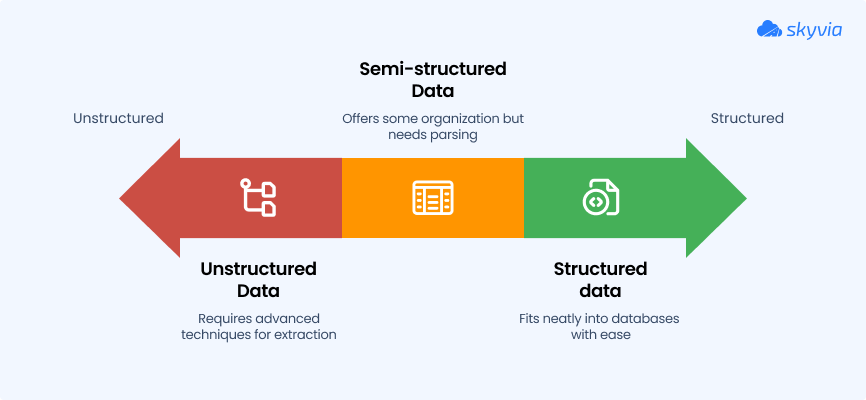
Trying to make sense of different data types can be a headache. One format fits neatly into your database, another lives in a thousand PDFs, and the third floats somewhere in between. Without a clear comparison, it's easy to mix them up and waste time.
This table shows how structured, semi-structured, and unstructured data differ in format, storage, processing, and where they shine.
It's built to clear up confusion and help you match the right data type with the right strategy.
| Category | Structured Data | Semi-Structured Data | Unstructured Data |
|---|---|---|---|
| Format | Tables, rows, columns (fixed schema). | Flexible structure (JSON, XML, etc.). | No fixed format (text, media, docs). |
| Storage | Relational databases (SQL, MySQL, PostgreSQL). | NoSQL databases, cloud storage, data lakes. | File systems, object storage, cloud drives. |
| Processing | Easily queried with SQL. | Requires parsing but supports partial querying. | Requires advanced tools (AI, NLP, ML). |
| Typical Use Cases | Reporting, dashboards, transaction logs. | APIs, config files, data exchange between systems. | Support tickets, social media, call recordings. |
| Pain Points Solved | Speed, precision, reliable automation. | Flexibility across systems, schema-on-read. | Deeper insights, context, customer sentiment. |
| Tools That Handle It Well | SQL engines, BI tools (e.g. Power BI, Tableau). | Skyvia, BigQuery, Snowflake, MongoDB. | Skyvia, ElasticSearch, NLP engines, cloud AI tools. |
How to Convert Unstructured Data into Structured Data
Unstructured data may be rich in value, but it's a pain to work with if you need it in dashboards, reports, or databases.
Whether it's customer feedback, invoices, or transcripts, turning that chaos into clean, structured rows is a must if you want to do something with it.
This process is called data transformation, and while it can get technical, the goal is simple:
- Extract useful details.
- Organize them.
- Make them queryable.
Let's break down how to get there, what tools help, and where things can go sideways.
Common Methods for Structuring Unstructured Data
- Manual Tagging or Categorization. Someone reviews the data and assigns labels to it. Slow, but sometimes necessary when precision matters.
- AI/ML Classification. Machine learning models can scan unstructured inputs (like emails or reviews), detect patterns, and assign categories, sentiment scores, or topics automatically.
- ETL Tools with Text Parsers. Modern ETL platforms (like Skyvia, Talend, or Apache NiFi) can convert text values into other data types.
- Regular Expressions and Scripting. For more technical teams, regex and scripts can extract data from semi-consistent formats like logs, reports, or scraped HTML.
Challenges and Best Practices
Top Challenges:
- Inconsistent formatting (one document = one surprise).
- Ambiguous language and context.
- Lack of training data for AI/ML models.
- Privacy and compliance risks when dealing with sensitive unstructured inputs.
Best Practices:
- Focus on one high-value unstructured source first.
- Use pre-trained NLP or OCR models before building from scratch.
- Store both raw and structured versions side by side for traceability.
- Validate early and often. Human-in-the-loop beats black box errors.
Technologies That Help Make It Happen
- NLP (Natural Language Processing). Understands human language and extracts meaning from text (e.g., names, locations, intent).
- OCR (Optical Character Recognition). Reads data from scanned documents, PDFs, images, etc.
- Speech-to-Text Engines. Transcribe voice data into searchable text.
- Cloud AI APIs (e.g., Google Cloud, AWS Comprehend, Azure Cognitive Services). Offer plug-and-play tools for extracting structure without requiring manual model building.
- Data Integration Platforms (like Skyvia). Help move and transform structured outputs into target systems automatically.
Popular Tools and Platforms for Managing Different Data Types
Structured, unstructured, and semi-structured data require different types of platforms, depending on how they are stored, queried, and analyzed.
The tables below display the top tools in each category, plus the integration platforms that help tie everything together.
Tools for Structured Data
| Category | Tools |
|---|---|
| Relational DBs | MySQL, PostgreSQL, SQL Server, Oracle |
| Data Warehouses | BigQuery, Redshift, Snowflake, Azure Synapse |
| BI Tools | Power BI, Tableau, Looker |
Tools for Semi-Structured Data
| Category | Tools |
|---|---|
| Document DBs | MongoDB, Couchbase, Amazon DocumentDB |
| JSON/XML Support | Snowflake, BigQuery, Redshift |
| Processors/Parsers | jq, XMLStarlet, Apache NiFi |
Tools for Unstructured Data
| Category | Tools |
|---|---|
| Data Lakes | Amazon S3, Azure Data Lake, Google Cloud Storage |
| NoSQL Databases | MongoDB, Cassandra, Elasticsearch |
| AI/NLP/OCR Tools | AWS Comprehend, Google Cloud AI, Azure Cognitive Services, Tesseract OCR |
Tools for Data Integration
| Platform | Description | Best For |
|---|---|---|
| Skyvia | ETL, ELT, and reverse ETL cloud platform that supports importing, exporting, replication, and synchronization across 200+ cloud apps and databases. Great for teams that want to automate workflows without coding. | Non-technical teams, SMBs, fast setup without code. |
| Fivetran | A fully managed ELT solution built for analytics. It connects to popular data sources and pipes data directly into modern warehouses like Snowflake and BigQuery. Known for its reliability and minimal setup. | Analytics teams, modern data stacks, and hands-off syncing. |
| Talend | An open-source and enterprise-ready ETL platform. It supports complex data transformation workflows and works well for organizations with both cloud and on-premise systems. It’s a favorite for compliance-heavy industries. | Enterprises, hybrid environments, regulated sectors. |
| Informatica | A powerful enterprise data integration suite. It handles everything from batch ETL to data governance and metadata management. Best suited for large-scale data environments and regulated industries. | Large-scale operations, compliance-heavy industries. |
| Apache NiFi | An open-source tool built for real-time data flows. It’s ideal for routing, transforming, and managing data streams between systems. Great when latency, volume, and flow control are key. | Real-time data, IoT, high-volume pipelines. |
| Airbyte | A fast-growing open-source data integration platform. It offers a wide catalog of connectors and allows custom development when needed. Popular among startups and data engineering teams who want flexibility and control. | Startups, data engineers, and teams wanting open-source control. |
Future Trends in Data Management
The way we handle data is changing rapidly. Businesses are facing a flood of real-time data, stricter compliance rules, and growing pressure to extract insights from every byte.
Here are the trends reshaping how teams manage, move, and analyze data in 2025.
Streaming Data Takes the Lead
Batch is fine for reports, but real-time is where the action is. From IoT sensors to e-commerce events, streaming data pipelines are becoming the norm.
Tools like Apache Kafka, AWS Kinesis, and Snowflake's streaming ingestion make it possible to act on data as it happens, not hours later. The future? Event-driven everything.
Why it matters:
- Faster reactions mean a competitive edge.
- Powers real-time dashboards, fraud detection, and live personalization.
- Cuts the latency between action and insight.
AI and ML Are Moving From Insight to Automation
AI is no longer just about spotting trends. It's starting to drive decisions. Machine learning models are now embedded into workflows rather than being bolted onto dashboards. From classifying unstructured documents to predicting customer churn, AI is becoming a core part of data operations.
Expect more of:
- Automated data labeling and classification.
- AI-powered data cleaning and anomaly detection.
- ML models that retrain themselves as new data flows in.
Data Governance Gets Smarter
As data privacy laws get tougher (hello, GDPR 2.0), governance is no longer optional. Businesses are shifting from reactive audits to proactive controls, like tracking data lineage, enforcing access policies, and automating compliance checks.
Emerging priorities:
- Automated data cataloging and classification.
- Role-based access and field-level security.
- Real-time compliance checks baked into data pipelines.
Conclusion
Data is your most valuable asset, but only if you know how to manage it. Structured, unstructured, and semi-structured ones have their own strengths, quirks, and best-use scenarios.
The key is choosing the right strategy for your business needs.
- Use structured data for speed, precision, and reporting.
- Lean on unstructured data to capture customer voice, behavior, and nuance.
- Embrace semi-structured data for modern, API-driven, and flexible workflows.
- Connect it all with smart data integration tools like Skyvia, which can handle any format without incurring tech debt.
You may scale operations, modernize your stack, or just try to make smarter decisions; the data strategy you choose will define how fast you can move and how clearly you can see.
Make it intentional. Make it adaptable. Make it work.FAQ
What industries rely most on unstructured data?
Industries like healthcare (medical records, imaging), legal (contracts, case files), media and entertainment (video, audio content), marketing (social media, customer feedback), and research (scientific papers, lab notes) heavily depend on unstructured data for insights and operations.
Can unstructured data be stored in traditional databases?
Technically, yes, but it's not ideal. Traditional relational databases are optimized for structured data. Unstructured data is better stored in object storage (like S3), NoSQL databases (like MongoDB), or specialized platforms (like Elasticsearch) that can handle text, media, and variable formats efficiently.
How does structured data affect machine learning?
Structured data is excellent for supervised learning, classification, and regression tasks because it's clean, labeled, and ready for algorithms. However, unstructured data (text, images, audio) often provides richer context and is essential for deep learning, NLP, and computer vision applications. The best ML models often combine both types.
Is semi-structured data better than unstructured data for analytics?
Semi-structured data (like JSON, XML) is often easier to work with than fully unstructured data because it has some organization (tags, keys) that makes parsing and querying more straightforward. However, "better" depends on your use case: unstructured data can contain richer context, while semi-structured data offers a middle ground between flexibility and analyzability.
How to choose between structured and unstructured data storage?
Choose structured storage (relational databases) when you need fast queries, consistent reporting, and transactional integrity. Choose unstructured storage (object storage, NoSQL) when dealing with documents, media, logs, or data that doesn't fit a fixed schema. Many modern businesses use both: structured for operational data, unstructured for content and analytics.
What tools are best for analyzing unstructured data?
Tools like Elasticsearch (for text search), Apache Spark (for large-scale processing), cloud AI services (Google Cloud NLP, AWS Comprehend), specialized platforms (like Databricks), and data integration tools (like Skyvia) that can extract and structure unstructured data for analysis.
Is unstructured data harder to manage than structured data?
Yes, generally. Unstructured data requires more advanced tools (AI/ML, NLP, OCR), more storage space, and more processing power. It's also harder to query, search, and integrate into traditional workflows. However, with the right tools and strategies, businesses can unlock valuable insights from unstructured data that structured data alone can't provide.